


 Enhanced Online Purchasing Experience
We are excited to announce that Swagelok is launching its new e-store on May 24th, 2021. In this first release of our site, we hope you will enjoy many new features including a new account dashboard, ability to save customer part numbers, calculate shipping and tax, and much more. We are excited to build and expand on functionality, and hope you are open to sharing your experience with us.
Expanded Functionality |
||
|
|
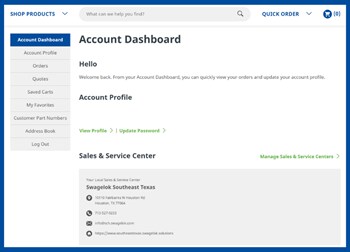
Account DashboardEverything together all in one place. View quotes and order history, add and save customer part numbers, and create "favorites" part lists, all in one easy to access location. Want to learn more? Download any of the following Quick Reference Guides: |
|
|
|
Quick OrderKnow what you already want? Quickly enter part numbers into the form, import from your file, or use our template. Want to learn more? Download the following Quick Reference Guide: |
|
.ashx?h=252&w=350&hash=C1184DCEA7BAD288F76CFF7BE46F5494)

Shop Now
Experience the new e-commerce today — with increased search functionality, new account dashboard, ability to add your own part numbers to our existing product, calculate shipping and tax, and much more.

Your Complete Guide to Swagelok® E-Commerce
Download our collection of Swagelok® E-Commerce guides to help you breeze through your purchasing experience.

Request Help
Request a free consultation with our trained professionals to get started on your new purchasing experience
Frequently Asked Questions
How do I log in?
Use the email address you originally registered your account with. You no longer need a username. If you do not have an account, click the Register button.
Can I upload a spreadsheet with part numbers and quantities?
Yes! You can upload your spreadsheet from the Quick Order feature or download the available template and enter in your information.
Can I share a cart with colleagues?
From your cart, click on the envelope icon in the right hand corner and email all items in your cart.
What if I have multiple sales and service center accounts?
With the new e-commerce site, you can easily add and manage sales and service centers with one account in the Account Dashboard.
I can't find a part number that I know exists. How do I add it to my cart?
Enter the part number and quantity into the Quick Order form and Add To Cart. The part number will come across to our Customer Service team for validation via quote submission.
Why will my order only submit as a quote?
If your order includes a part number with no price, the system will recognize the order as incomplete and will require you to submit a quote first. If a quote is not required, include in the notes "No quote needed, place order".